A wall of text
A wall of text before a single push-up.
“I didn't like that they wrote a whole paragraph of information about what they're asking for in the starting screen itself”
Teardown 06
A push-up counter with its habit loop half hidden
“pushr presents itself as the top push-up counting app, using facial tracking to count reps and track progress in an interface built to keep you motivated.”
10 screens · about 3 min
start ▶Fifty push-ups a day. I keep losing count, and the habit.
pushr counts your push-ups for you with facial tracking. Put your phone on the floor, screen up, and do your push-ups over it: each time your face comes down toward the screen, that's one rep. hi code -- To see your face, pushr needs your camera. On the next screen, your iPhone will ask you for camera access. The camera is only used to count your reps while a workout is running, and you can turn it off at any time in Settings. You can also save your workouts to the Health app, keep a daily streak, and share a workout when you're done.
continueFig. 1: The welcome screen: a paragraph before a single push-up.
A wall of text before a single push-up.
“I didn't like that they wrote a whole paragraph of information about what they're asking for in the starting screen itself”
… each time your face comes down toward the screen, that's one rep. hi code -- To see your face, pushr needs your camera. On the next screen, your iPhone will ask you …
Fig. 2: Close up: leftover text in the copy.
Wait. Is that leftover code?
“I can see `hi code --` used in the content itself there.”
pushr counts your push-ups for you with facial tracking. Put your phone on the floor, screen up, and do your push-ups over it: each time your face comes down toward the screen, that's one rep. To see your face, pushr needs your camera. On the next screen, your iPhone will ask you for camera access. The camera is only used to count your reps while a workout is running, and you can turn it off at any time in Settings. You can also save your workouts to the Health app, keep a daily streak, and share a workout when you're done.
pushr uses the camera to count your push-ups.
Fig. 3: So the long text was for the camera.
Oh, that long text was for this. Fair.
“Then it basically explains what the particular app does, and then it asks for camera permission.”
setup is complete
Fig. 4: Setup done: start now, or later.
Now or later. My choice.
“After the setup is complete, you can start the workout right now or later, all good.”
join pushr
Fig. 5: The plan I tap grows; the other shrinks.
The plan I tap grows. Clear.
“One of the things that is interesting from a very visual perspective is how they have multiple cards that contract and expand based on the user clicking.”
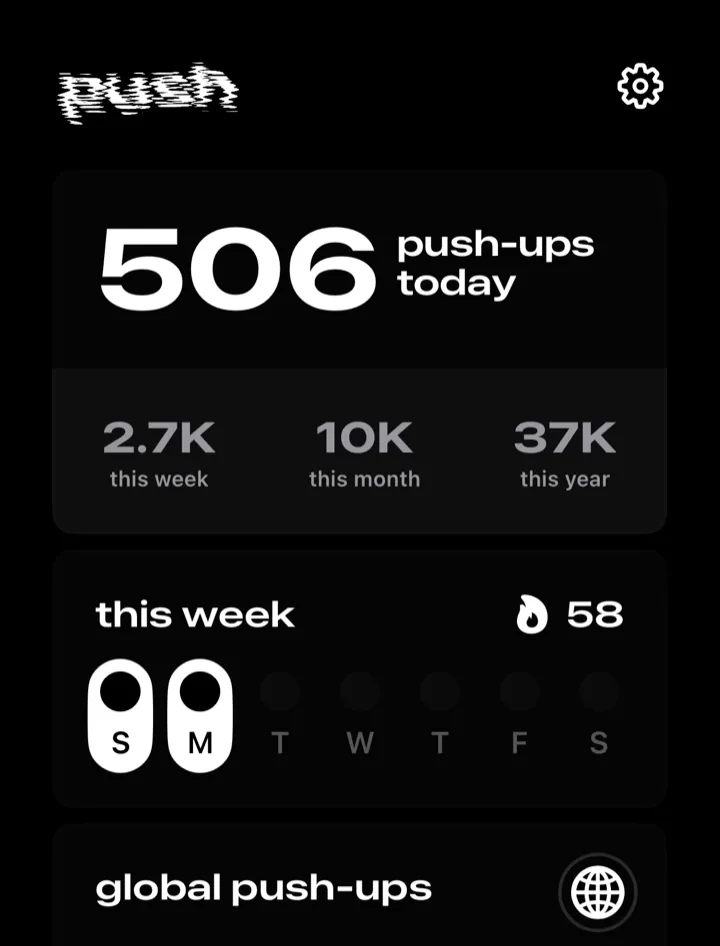
Fig. 6: Push-ups per day, and a streak.
What happens on the day I miss?
“It showcases the number of pushups you did every day, and it keeps a streak. If you miss a day, it won't show up here.”
SET 4
7Fig. 7: The counter ticks. Nothing says it's right.
It counts me by camera. Is it right?
“use the camera to get all the pushups calculated.”
REMINDERS
Fig. 8: Reminders live deep in settings.
The nudge that keeps me going is buried.
“In this, you have to go to the settings to schedule pushups for different timings that will remind you that you have to do pushups. Same thing for deleting as well.”
REMINDERS
Fig. 9: Reminders move from settings to the streak.
Remind me where I keep my streak.
“Bring reminder scheduling out of settings, for example into setup or onto the streak screen”
C+
Our grade
Count, streak, remind. Don't hide the third.
“Polished-looking, with a clear habit loop (count, streak, remind), but the reminders that support that loop are hidden, onboarding has a visible bug, and the core counting claim is still unverified.”